
How to make an AI music video, step by step
Song, characters, shots, lip-sync and the edit, each step shown on our own music video. What worked, what we dropped, and what every part really cost.

In this articleWhat we made, and the order that worked
- What we made, and the order that worked
- Step 1: write the song, then build your cast
- Step 2: generate the shots, and why we left Seedance
- Step 3: map the song, then lip-sync one line at a time
- Step 4: edit to the beat, and watch every version
- What it cost, and what we’d tell anyone starting
- Questions people also ask
- Sources
What we made, and the order that worked
Between 4 and 10 November 2026 we made a music video for our own song, “Patient Zero”: two AI characters, Kade and Nova, singing their own lines across London at night, cut to the beat for three minutes and 42 seconds. Here it is, start to finish.
It’s UK rap verses and an R&B hook over a dark club beat, at 123 beats a minute, about being the one who starts the trend rather than copying it. The hook is “I’m patient zero, everybody caught it from me”, and it ends on a chant and “Start your own movement.” We also made a house remix of it, but the steps are the same, so this guide follows the Street Mix.
The whole thing cost about $68 in AI generation, for both mixes, including every test and every reroll. Here’s the order that got us there, and the one we’d tell anyone to follow:
- The song. Everything is timed to it, so it has to be finished first.
- The characters. Made once, then used as the reference for every shot.
- The shots. B-roll, story shots and anything you need to show, generated in batches.
- The song map and the lip-sync. Find every beat and every word, then make each sung line.
- The edit. Cut to the beat grid, watch it, fix it, render again.
Nobody touched a timeline in an editing app. Claude wrote a small editing engine in Python and ffmpeg, Chris watched every version on his phone and gave notes, and it took 11 versions to get the Street Mix right. More on that below.
Step 1: write the song, then build your cast
The song. We asked Claude to write the lyrics and the style prompt for Suno, then made the track in Suno. This is the style prompt we used:
dark deep house with UK rap, 122 bpm, four on the floor kick, warm rolling sub bass, moody minor key pads, after hours club atmosphere, smooth confident male rap verses, soulful R&B female vocal hook, filtered build into a heavy drop, late night, cinematic
Exclude styles: rock, country, trap hi-hat rolls, cheesy pop, acoustic
Two things worth copying: it names both voices (a male rapper on the verses, a female singer on the hook), which is what gave us two characters to cast, and it rules out the styles we didn’t want. Don’t take the tempo on trust, though. We asked for 122 beats a minute and the track came out at 123, which matters later when every cut is timed to the beat.
Whatever tool you use, finish the song before you generate a single shot: the length, the sections and every sung word decide how many clips you need and what each one shows.
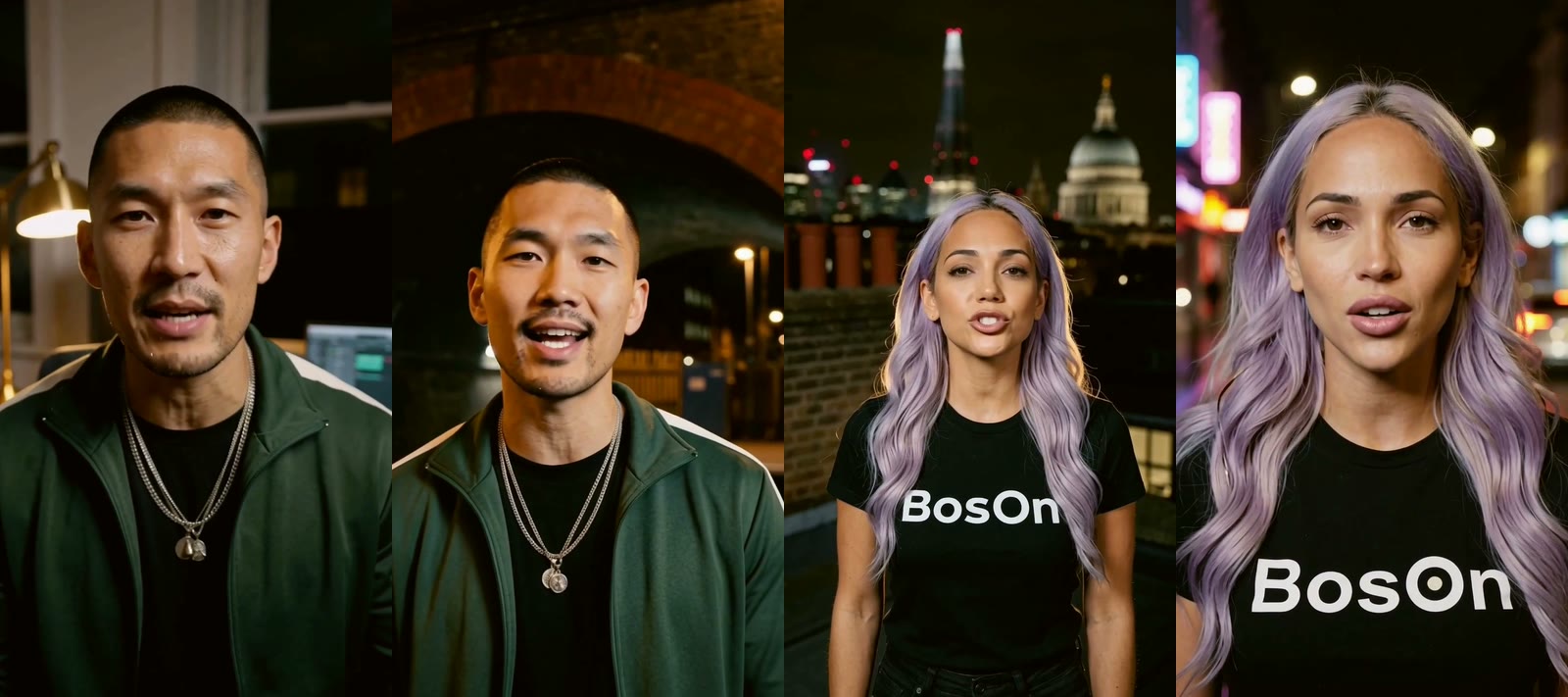
The characters. Kade is a UK rapper in a green tracksuit and chains; Nova is a singer with lilac hair and a BosOn T-shirt. We made both in BosOn’s Character Studio from very simple prompts, each as a character sheet: the same face from several angles.
From each sheet we cropped a front view and a portrait to use as references. Nova’s portrait needed padding to meet the video model’s minimum size and shape, a small thing that’s easy to miss. Those crops went into every shot that showed them, which is what kept their faces the same from the first clip to the last. (Our guide to keeping AI characters consistent goes into this properly.)
The stills for lip-sync. Lip-sync needs a big face in the frame, so we made 10 medium close-up stills with Google’s Nano Banana 2.1, editing from the references: Kade at his studio desk, on a night bus, under a railway arch, in a club, on a rooftop and in his kitchen; Nova on rooftops with the Shard and St Paul’s behind her, on a neon street and in a club. Each sung line starts from one of these.
Step 2: generate the shots, and why we left Seedance
All the generation ran through fal: one account and one key for every model, which made it easy to switch models halfway through. (fal is one of the services you can connect to BosOn.)
We started on Seedance 2.5. Seedance makes beautiful, cinematic clips, and we storyboarded about 20 shots of a day in Kade’s life at 480p and 5 seconds each. On fal that’s roughly $0.22 a second at 480p, so about a dollar a clip. The problem wasn’t the quality. Seedance’s likeness filter refused our own character sheets at random, characters we had made ourselves, and sometimes even a still of Nova. You can’t build a video round two lead characters if the model won’t reliably let them in. A few of Kade’s b-roll shots from that batch made the final cut; everything after it didn’t come from Seedance.
So we switched to MiniMax H3 Max (Hailuo). It accepted both characters every time. We made our clips during fal’s launch discount, when H3 Max image-to-video cost $0.035 a second at 480p and $0.056 at 768p, so most clips cost us between about 18 and 25 cents: about a fifth of a Seedance clip. Be aware that fal’s page says standard rates apply from 16 November 2026: $0.05 a second at 480p and $0.08 at 768p, for image-to-video and reference-to-video alike. That’s still well under half the price of the Seedance clips we’d been making.
Chris’s rule from then on: H3 at 768p, not 480p. It gives the edit a better starting point.
H3’s habits, and the prompt that fixed each one:
- It put an Apple logo on laptops. Fixed by showing the laptop side-on, or saying “no logo”.
- “Night rooftop” got New York’s skyline. Fixed by naming the Shard and St Paul’s.
- It added garbled text to phone screens, shop signs and number plates. Fixed with “no interface, no text, no number plates”, then by checking every frame at full size and rerolling the ones that still had it.
What we generated, about 130 clips in all:
- Kade and Nova b-roll: the studio, the kettle, the laptop, the night bus, the club, the rooftop, getting ready (fastening a chain, putting in an earring), Kade getting into his car.
- Feature shots: the song name-checks the things a creator does, so we made a stylised shot for each, never a screen recording. A glowing waveform stands for Sound Lab, clips snapping onto a holographic timeline for Timeline, a wall of video tiles for the Library, a turnaround for Character Studio, and morphs for Collider: a car turning to chrome, one woman becoming another, a street going from day to night to snow.
- “What a creator can make”: a phone video bursting into the room, a creator’s video on a giant screen over a London square, dragons filling a bedroom, a graffiti mural peeling off the wall.
- Aspirational b-roll: supercars, watches, rooftop bars, Mayfair, the South Bank, a rooftop party.
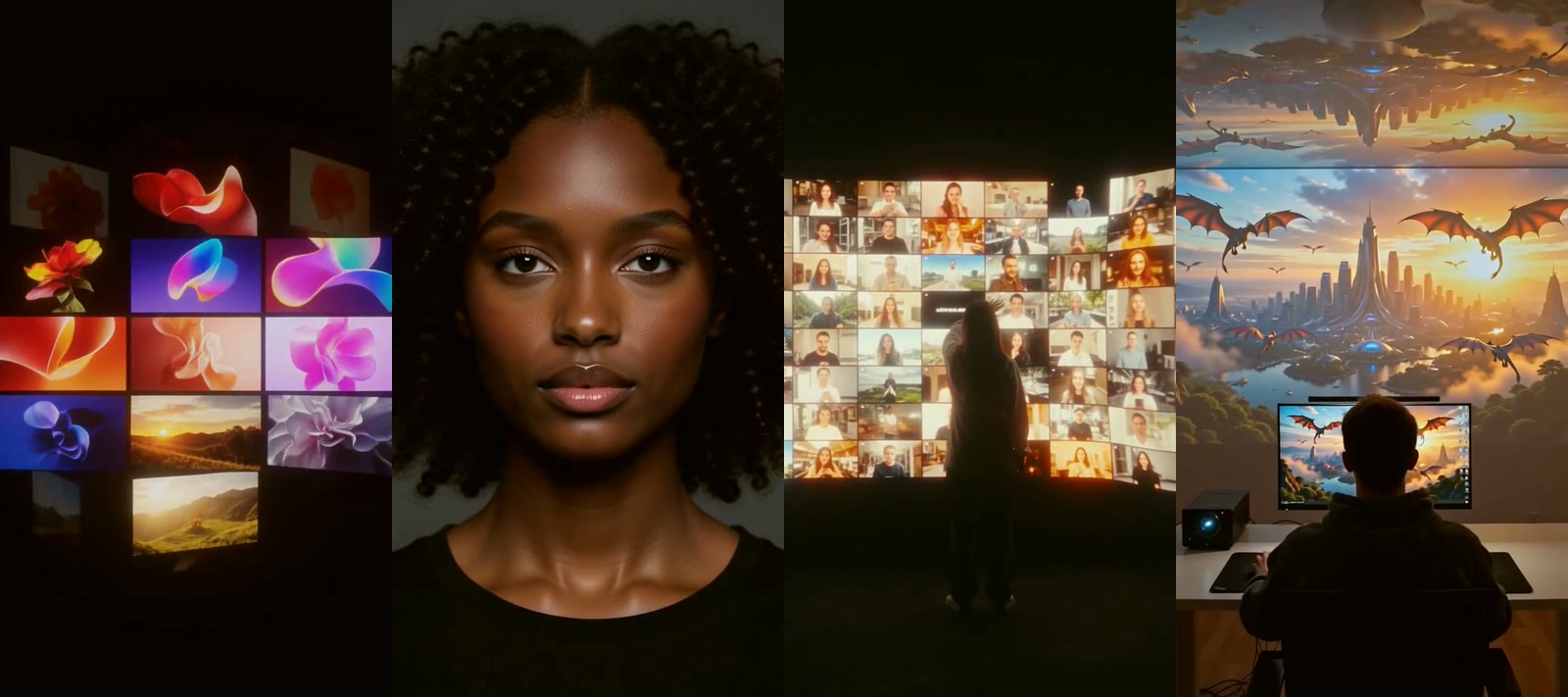
These shots stand for what our studios do. The video itself wasn’t made inside BosOn: the shots came from fal, and the edit was done in code.
Step 3: map the song, then lip-sync one line at a time
Map the song before you cut anything. Claude broke the track down four ways:
- The vocal on its own, separated from the music with Demucs on fal, for about 15 cents.
- A timestamp for every word, from faster-whisper run on our own computer. Whisper mishears sung words (“why” came out as “I’m”), so every timing was checked against the lyrics.
- A beat grid, from librosa, then nudged to line up with the kick drum. At exactly 123 beats a minute, every cut could land on a beat or a bar line.
- The sections, from how loud the mix, the kick and the vocal were in each bar: intro, verses, pre-chorus, choruses, drops, breakdowns and outro.
Then test lip-sync before you commit. We made the same two lines, one Kade and one Nova, three ways, at the prices we paid in November 2026:
| Route | Model | What we paid | What we found |
|---|---|---|---|
| A | Sync Lipsync v3 (re-syncs a clip you already have) | $0.13 a second | Keeps the shot, but small faces in wide shots look soft |
| B | Kling AI Avatar v2 Pro (a still plus the audio) | $0.115 a second | The clearest mouths, in full HD |
| C | MiniMax H3 Max image-to-video, with the vocal fed in | $0.035 a second | Chris’s pick: “Kade’s was perfect”, at a third of the price |
We went with C for every sung line. How we used it:
- One clip per sung line, from a medium close-up still, with that line’s slice of the separated vocal as the audio. Feed the vocal, not the full mix.
- Start each slice on the first word, with no lead-in. Doing that for Nova’s lines tightened her sync noticeably.
- Two bars at most per close-up, then cut to b-roll and back. Any small drift never has time to show.
- Split lines the singers trade. Where Kade and Nova swap words inside one line (“one idea, one night, one clip”), we split the line between them or covered it with b-roll.
Who sings what was the hardest part. Pitch analysis misread Nova’s voice an octave low on the hooks and gave them to Kade. So we set a firm rule: Chris’s ear decides who sings a line, and we change only the lines he flags. The one version where Claude “fixed” extra lines from the analysis came out worse. In a duet, trust a person over the software.
Step 4: edit to the beat, and watch every version
Instead of an editing app, Claude wrote a small editing engine. For each version there’s a cut list: every section of the song has its shots, measured in beats, and the song is the master clock. Each shot is rendered as its own 1080 by 1920 clip at 30 frames a second with the same warm grade, then they’re joined and the untouched song goes underneath.
Most of the engine’s rules came straight from Chris’s notes:
- No shot more than three times, never twice in one section and never back to back. For each section the engine picks the least used shot from a pool.
- Repeats are mirrored or punched in, but never anything showing the BosOn shirt or a sign. It read “nOsoB” once.
- Morphs are centred on the moment of change, found by comparing frames, so the transformation is always on screen.
- The lyrics cue the feature shots: “characters on deck, collider in the mix”, “sound lab cooking”, “timeline tight” and “library stacked” each land on their own shot.
- Fast cuts and punch-ins on the drops, longer holds in the breakdowns, a white flash on each drop’s first beat, and captions building up to it: DON’T WAIT, DON’T CHASE, DON’T COPY, CREATE.
Check the maths on every render. The video’s frame count must match the song’s exactly: 6,672 frames for the Street Mix. Once, three frames of overlap put everything after 1:53 a tenth of a second late, enough to throw the lip-sync off. Now the engine refuses to render if any cut overlaps or leaves a gap.
Then watch it, on a phone. Chris watched each version where people will, and each note was one quick render:
- Version 1: the lip-sync was off, the intro dragged and the app clips didn’t fit the frame. The app footage was replaced with our own stylised shots, and the intro cuts on every bar.
- Versions 3 and 4: the characters sang each other’s lines, and sang over bars with no vocal. That’s when the strict singer rules came in.
- Versions 4 to 6: too much repeated b-roll, so more shots. Over 70 different shots by version 6.
- Version 7: a more obvious face swap (the old one “looked like make-up”), and a more diverse cast in the aspirational shots.
- Versions 8 and 9: the second half had turned into “a fashion shoot”, so the shots of what a creator can make came in, and a coffee advert and some cartoony character shots came out.
Cutting it under three minutes for Reels and Shorts. Every cut we tried in the middle of the Street Mix could be heard, because its sections run straight into each other with hardly a breath in the vocal. What worked was no cut at all: the 2:57 version plays uncut up to the closing chant, then the end card comes up while the chant fades underneath. The house remix was easier: one cut of exactly 24 bars, from the end of the second verse straight into the second drop, and because it’s a whole number of bars the beat carries straight across. On a song that never stops, an early fade beats a clever splice.
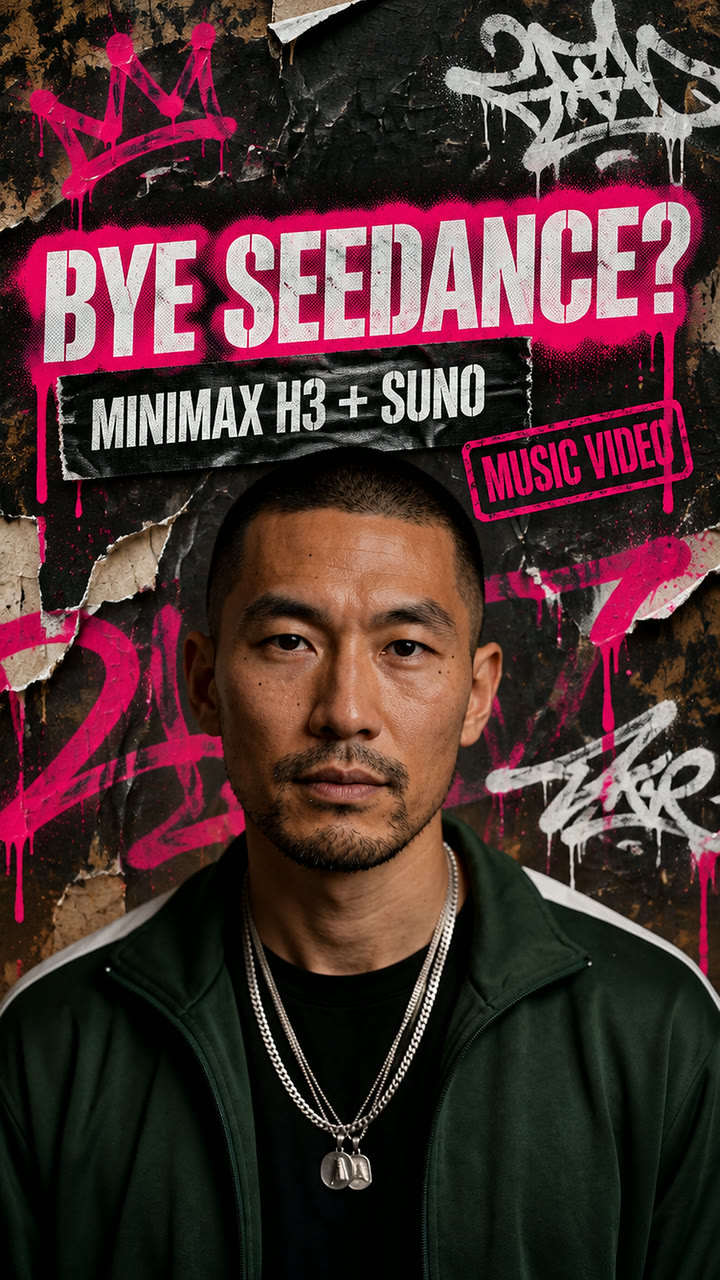
The cover. We made it with GPT Image 2.6 on Higgsfield, from a clean frame of Kade staring down the lens, in our street flyer look: “BYE SEEDANCE?” in a white stencil with a hot pink spray outline, “MINIMAX H3 + SUNO” on gaffer tape and a “MUSIC VIDEO” stamp. It was resized to 1080 by 1920 the plain way, not with an AI upscaler.
What it cost, and what we’d tell anyone starting
Here’s every dollar of AI generation across both mixes, tests and rerolls included:
| What | About |
|---|---|
| The first storyboard batch (mostly Seedance) and character tests | $16 |
| The lip-sync tests (three routes) and the separated vocals | $3 |
| The Street Mix lip-sync batch (23 clips) and the 10 Nano Banana stills | $4.60 |
| Feature shots, b-roll, aspirational and creator shots (about 90 clips, H3) | $22 |
| Fixes, rerolls and swaps | $4 |
| The house remix (its vocal, 12 house shots, 20 lip-sync clips, intro shots) | $6 |
| An upscaling test we didn’t use | $18.50 |
| Total | about $68, or about $50 without the upscale |
Two things aren’t in that table. First, the H3 clips were made at fal’s launch discount; at its standard rates from 16 November 2026 they cost more. Second, the subscriptions we already had: a Claude Max plan (Claude’s pricing page lists Max at $100 a month on 10 November 2026), which wrote the lyrics, analysed the song and did the edit; Suno Pro for the track (Suno’s pricing page shows $8 a month, billed monthly, the same day); and a Higgsfield plan for the cover.
What we tried and dropped:
- AI upscaling. ByteDance’s video upscaler at its pro tier made everything sharper on paper, but Chris found the faces “too plasticky”. The finals are the clean 1080p renders.
- Covers drawn in code. Flat and generic next to a proper generated cover.
- Letting software decide who sings. Useful on the obvious lines, wrong on the duet hooks.
What we’d tell anyone making their first one:
- Pick the model that accepts your characters. The best-looking model is no use if it refuses your cast.
- Lip-sync from medium close-ups, two bars at most. Big faces, short shots.
- Feed the separated vocal, not the full mix, and start each slice on the first word.
- A human ear beats pitch analysis for who sings what.
- Edit to the beat grid, not by eye. Locking every cut to the kick drum is what makes it feel like a real music video.
- Make your own feature shots. Stylised shots fit a music video; screen recordings don’t.
- Check every frame for AI tells: garbled text on phones, signs and number plates, and stray logos.
- Don’t over-process. The upscale made it look more artificial, not better.
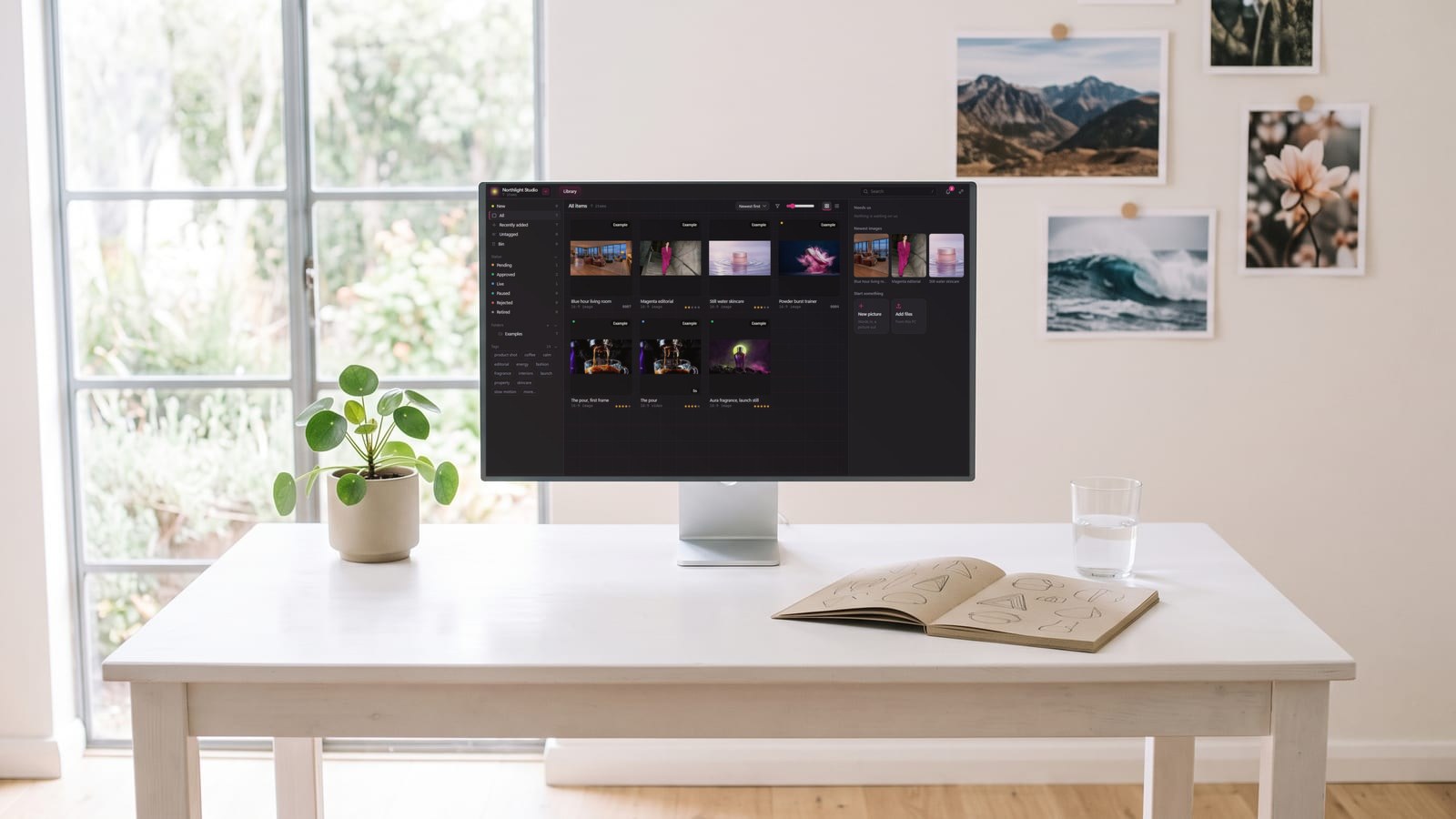
A music video like this means about 130 clips, over 40 lip-sync takes, ten stills, two character sheets and a stack of draft covers, from several services, most with file names that say nothing about what’s in them. Keeping them where we could find them again, by character, by shot and by what we’d asked for, is the part BosOn does for us.
Don’t copy. Create. Start your own movement.
Questions people also ask
How much does it cost to make an AI music video?
Our two music videos for the song Patient Zero, each about three and a half minutes, cost about $68 in AI generation in November 2026, including every test and reroll, or about $50 without an upscaling test we didn't use. That was during fal's launch discount on MiniMax H3 Max; at its standard rates from 16 November 2026 the H3 clips cost more. Subscriptions for the song, the cover and the editing were extra.
Which AI is best for lip-syncing a music video?
In our November 2026 test of the same two sung lines, Kling AI Avatar v2 Pro gave the clearest mouths, Sync Lipsync v3 kept the original shot but softened small faces, and MiniMax H3 Max image-to-video with the vocal fed in matched our characters best for the lowest price. We used H3 Max for every sung line.
How long should a lip-sync shot be in a music video?
Short. We kept every sung close-up to two bars at most, then cut to other footage and back. Short shots hide any small drift between the mouth and the voice, and they keep the edit moving like a real music video.
Why did we switch from Seedance to MiniMax H3 for our music video?
Seedance 2.5 makes beautiful clips, but in November 2026 its likeness filter refused our own character sheets at random, and sometimes a still of our singer too. MiniMax H3 Max accepted both characters every time, and on fal it cost a fraction of the price per clip.
Can I use a Suno song in a music video I post online?
Suno's pricing page lists commercial use rights on its Pro plan, and says to see its terms of service for the limits. Check the terms for the plan you made the song on before you post or monetise the video.
Sources
- fal: MiniMax H3 Max Image to Video (pricing and the audio input)
- fal: MiniMax H3 Max Reference to Video (pricing)
- fal: MiniMax H3 vs MiniMax H3 Max, what's the difference?
- fal: Seedance 2.5 Text to Video (pricing)
- fal: Kling AI Avatar v2 Pro
- fal: sync-3 Lipsync
- Demucs, music source separation (GitHub)
- faster-whisper (GitHub)
- librosa: audio and music analysis in Python
- Suno: pricing
- Claude: pricing
Keep reading
All guides
Make it anywhere, find it in BosOn.
Every picture, video and sound you make with AI, in one library on your computer.
Request early accessNight drive, made with Kling 3.0 from a GPT Image 2.5 still