
Kie.ai or Higgsfield: which suits which creator?
Kie.ai is a pay-as-you-go API that runs over a hundred AI models through one key, built for developers; Higgsfield is a creative studio in your browser, on a subscription, with its own tools for characters, cinematic shots and ads. This guide sets them side by side from their own pages as of 11 October 2026, says where each is stronger, and how to use both.
Kie.ai is an API you pay by the job; Higgsfield is a studio on a plan
They answer different questions. Kie.ai asks which model you want to call; Higgsfield asks what you want to make.
Kie.ai describes itself as “an AI API platform for developers and teams”. One API key and one balance reach video, picture, music and chat models from many makers, including Seedance, Kling, Veo, Nano Banana, GPT Image, Suno, Claude and Grok, and you pay only for what you use. Its market listed 116 models when we looked on 11 October 2026.
Higgsfield calls itself “an AI-native creative suite”: its own tools for characters, cinematic video and ads, plus a growing library of other companies’ models such as Seedance, Kling, Veo and Nano Banana, under one subscription. Its help centre says no editing, design or machine learning experience is needed for a first generation.
So the short answer: if you build things, or you want one model as cheaply as possible per clip, look at Kie.ai. If you want to make pictures and video in a studio built for it, look at Higgsfield. If you want both, you can have both, and the last section shows how.

Side by side, from their own pages
Read on 11 October 2026. Prices change too often to print here: see Kie.ai’s pricing page and Higgsfield’s pricing page.
| Kie.ai | Higgsfield | |
|---|---|---|
| What it is | An API platform: one key for many makers’ models | A creative suite in the browser |
| Built for | “Developers and teams” | Creators; no experience needed to start |
| How you pay | Credits, pay as you go, no monthly fee; credits never expire | A subscription |
| Models | Video, picture, music, voice and chat; 116 on its market | Higgsfield’s own Soul models, plus Seedance, Kling, Veo, Nano Banana and more |
| Its own tools | None beyond the models; a Playground to test each one | Soul ID, Cinema Studio, Marketing Studio, Canvas, Supercomputer, Higgsfield Audio |
| Where you use it | In your own code or app, or the Playground | higgsfield.ai, its API and its official MCP |
| Keeps your files | 14 days, then deleted | In Assets, while your subscription is active |
| Who runs it | Two US companies in Denver, Colorado | Higgsfield |
Where Kie.ai is stronger
- Range in one place. Video, pictures, music, voices and chat models from many companies, all on one balance, with the same way of asking for each.
- Paying only for what you make. No subscription to keep up. Kie’s terms say credits never expire, and its docs say you never pay for failed generations. Each key can have hourly, daily and total limits, so a mistake can’t run up a bill.
- A price for every model, in the open. Kie’s pricing page lists each model’s price beside the official (or fal) price, so you can see what one clip costs before you make it.
Kie is frank about the trade-off. Its docs say it is “built by a small startup team” and that occasional instability can happen at its prices. Generated files are kept for 14 days and then deleted, so anything you want to keep has to be downloaded. And it’s built for developers: the Playground is for trying a model, not for working day to day.
Where Higgsfield is stronger
- Tools, not just models. Soul ID trains a character from photos so the same face appears across pictures and video. Cinema Studio gives camera control and multi-shot scenes. Marketing Studio turns a product link or picture into a video ad. Canvas chains models on a board you can reuse. None of that comes with a bare API.
- Made for making. Everything happens in the browser, and Higgsfield’s help centre says a first generation needs no editing, design or machine learning experience.
- Your work stays put. Its help page What’s in my Higgsfield account? (updated 28 August 2026) says everything you make is saved to Assets automatically and stays there “while your subscription is active”.
- More than one way in. Its official platforms page, updated 24 September 2026, lists the website, an API console with its own docs, and an official MCP connector for AI apps. It has no desktop or mobile app; it runs in your browser.
Using both, and keeping what you make
Plenty of creators will want Higgsfield’s tools and Kie’s extra models. That usually means two websites, two sets of downloads and, with Kie, a 14-day clock on every file. That’s the gap we built BosOn for.
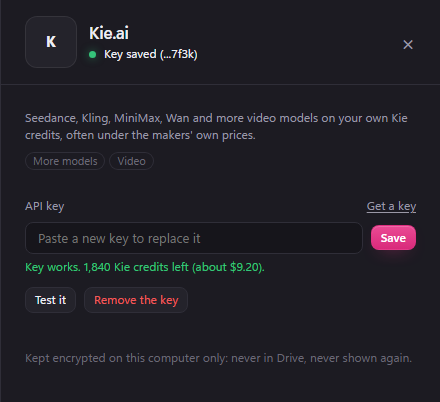
BosOn is our desktop app for Windows and Mac, in early access. It connects to your Higgsfield plan, the Higgsfield API and your own Kie.ai key (all three are Ready on our integrations page), so you make with each from one window on the accounts you already pay for. With a Kie key, the Video tool adds Kie’s video models, such as Seedance 2.5, Kling 3.0, MiniMax, Wan and Grok Imagine Video, each showing its price in dollars before you make it. Every clip comes back into your library on your own computer, named and dated, so Kie’s 14 days stop mattering.
The same goes for longer work. BosOn’s Explainer Studio, which turns a story into a narrated video scene by scene, can make its pictures, clips and voice on the Higgsfield plan, the Higgsfield API or your Kie key, chosen part by part, with each part priced first. See what else it makes on our Create page, or how it keeps everything in one place in our guide to where your AI pictures are saved.

BosOn is independent and isn’t affiliated with or endorsed by Kie.ai or Higgsfield.
Which to choose
- Choose Higgsfield if you want to make things rather than call models: characters that stay the same, cinematic shots, ads from a product link, all in a browser with no setup.
- Choose Kie.ai if you write code, run an app, or want many models on one pay-as-you-go balance with no subscription, and you’re happy to download what you make.
- Use both if Higgsfield’s tools are your main studio and you want Kie for models or prices it has that your plan doesn’t, then keep everything in one library so it doesn’t matter where each piece was made.
Questions people also ask
Is Kie.ai legit?
Kie.ai is an API platform jointly operated by two US companies, NEXUSAI SERVICES LLC and INNOLEAP AI LLC, of Denver, Colorado, according to its own About page. It resells access to other companies' models through one account. Its own docs say it is a small startup and that occasional instability can happen, so test it before relying on it.
Is Kie.ai free?
No. Kie.ai has no monthly fee and no subscription: you buy credits and pay for each job, and its terms say purchased credits never expire. Its docs say you never pay for failed generations. Each model's price is on Kie's pricing page.
Can I use Kie.ai without coding?
Partly. Each model on Kie.ai has a Playground where you can try it in the browser, but Kie describes itself as an API platform for developers and teams, and the Playground is for testing. To use Kie's models day to day without code, you need an app that connects to Kie with your key.
How long does Kie.ai keep my videos and pictures?
Fourteen days. Kie's docs say generated media files are stored for 14 days and then deleted automatically, and log records for two months. Download anything you want to keep.
Is Kie.ai cheaper than Higgsfield?
It depends on the model and how much you make, and both change their prices often. Kie.ai charges per job from a balance, and its pricing page lists its price beside the official one; Higgsfield sells plans with credits. Compare the model you actually use on both pricing pages.
Sources
- Kie.ai: About Kie.ai
- Kie.ai docs: Getting Started with KIE API
- Kie.ai: Pricing
- Kie.ai: Models market
- Kie.ai: Terms of Use
- Higgsfield Help Center: What is Higgsfield? (updated 14 September 2026)
- Higgsfield Help Center: What's in my Higgsfield account? (updated 28 August 2026)
- Higgsfield Help Center: What are the official Higgsfield platforms? (updated 24 September 2026)