
Higgsfield plan, API or MCP: which to use, and when
Use the plan to make things by hand on higgsfield.ai, the MCP to make them from an AI app such as Claude or ChatGPT on the same plan credits, and the API when you're building something or want to pay per generation with no subscription. This guide sets out how each works from Higgsfield's own pages as of 11 October 2026, what each costs you in credits or dollars, and how to keep them safe.
Three ways in, and two kinds of money
Higgsfield’s official platforms page lists the website, an API with its own console and docs, and an official MCP connector for AI apps. They sound like three doors to the same thing, but they’re paid for in two different ways, and that’s what decides which one you want.
| The plan | The MCP (and CLI) | The API | |
|---|---|---|---|
| Where you use it | higgsfield.ai, by hand | Inside an AI app: Claude, ChatGPT, Cursor, coding agents | Your own code or app |
| How you sign in | Your account | Your account, by OAuth; no key | A key with an ID and a secret |
| What it spends | Your plan’s monthly credits | The same plan credits | A separate dollar balance |
| Unlimited and free generations | Yes, on plans that have them | Never | Never |
| Needs a subscription | Yes, for credits | Yes, a paid one | No |
Read on 11 October 2026. Prices aren’t printed here because they change often: see Higgsfield’s plans and API pricing.

The plan: for making things by hand
The plan is the subscription on higgsfield.ai. Higgsfield’s plans page says “Every plan includes a monthly credit allowance that resets at renewal”, and that the free tier is limited to a small set of models with no credits.
Two things only work here. Unlimited: Higgsfield says “Unlimited access applies only on higgsfield.ai”, and that it’s “designed for personal, human use only”, with automation and scripts not allowed (Unlimited page). And the plan’s free generations, which also apply only on the website. Everything Higgsfield’s own tools offer, such as Soul ID, Cinema Studio and Marketing Studio, is here too.
Choose the plan if you make things yourself, in the browser, and especially if you lean on Unlimited models.
The MCP and the CLI: your plan, from an AI app
MCP is the standard way AI apps connect to other services. Higgsfield’s MCP lets an assistant such as Claude make pictures and video on your Higgsfield account while you talk to it.
From Higgsfield’s MCP page and connection guide, both updated 24 September 2026:
- No key. “MCP connects through OAuth authorization, no API key is needed.” You sign in with your Higgsfield account.
- The address is https://mcp.higgsfield.ai/mcp. In Claude, add it as a custom connector; in ChatGPT, Higgsfield has an official plugin in the Plugins Directory; Cursor has it in its marketplace.
- A paid plan. “An active paid subscription is required.”
- Always credits. “MCP always uses credits”, even on a plan with Unlimited, and there’s “no native credit cap”, so Higgsfield suggests telling the assistant to ask before it spends.
- What it does: picture and video generation across models, upscaling, Soul characters and Elements, voiceover and voice cloning, checking your balance and listing what you’ve made. What it makes is saved to your Assets, marked as from the MCP.
For coding agents such as Claude Code, Higgsfield offers a CLI instead, on the same account and plan credits. Its CLI page puts it simply: “Use MCP for chat agents like Claude web, and CLI for coding agents”. On Claude’s side, Anthropic’s connectors page says free users are limited to one custom connector.
Choose the MCP if you already work in an AI app and want to make things from the conversation, on credits you already pay for.
The API: for building, or paying by the job
The API launched on 16 September 2026. Higgsfield’s launch post says “There is no subscription: you top up a balance, pay per generation”, and “A plan on higgsfield.ai does not affect API access”. Its help page adds that your plan, credits and Unlimited “exist only on the website”.
How it works, from those pages and the API docs:
- Keys are made in the console at open.higgsfield.ai, and each has two parts, an ID and a secret. The docs say never to call the API from browser or mobile app code, where others could read the key.
- Money: a balance in dollars. Failed requests aren’t billed, an estimate endpoint gives a request’s cost before you run it, and the launch post says funds “expire one year after they are added to the balance”.
- Models: over 50 at launch, though Higgsfield says the catalogue “may differ from the model lineup on higgsfield.ai”, and it has no standalone audio models.
- Files: outputs are kept for at least seven days, so save what you want to keep.
- For builders: webhooks, status and cancel, and Python and TypeScript libraries. Higgsfield’s terms (section 11, updated 26 July 2026) bar sharing keys and acting as “a pass-through or service bureau” for its service, so read them before building something other people use.
Choose the API if you’re building an app or a workflow, if you make in bursts and don’t want a subscription, or as a backup for when your plan’s credits run out.
Which to choose, and keeping it safe
- You make things by hand, often: the plan, and Unlimited if your work suits it.
- You live in Claude or ChatGPT: the plan plus the MCP. Tell the assistant to ask before spending.
- You build, or make now and then: the API, with no subscription.
- You do a bit of everything: the plan for the website and the MCP, and an API balance as a top-up when credits run low.
Higgsfield is clear about copies: the only official connector is mcp.higgsfield.ai/mcp, and “A connector with any other URL is not Higgsfield”. It has no desktop or mobile app, and doesn’t sell plans through resellers. Never use a key you found online: the terms treat everything done with your access as your activity.
Using the plan and the API together
The plan-plus-backup set-up is the one we built into BosOn, our desktop app for Windows and Mac (in early access). It’s independent and isn’t affiliated with or endorsed by Higgsfield. In Connections you can sign in to your Higgsfield plan through Higgsfield’s official MCP sign-in, add a Higgsfield API key, or both; both are Ready on our integrations page.
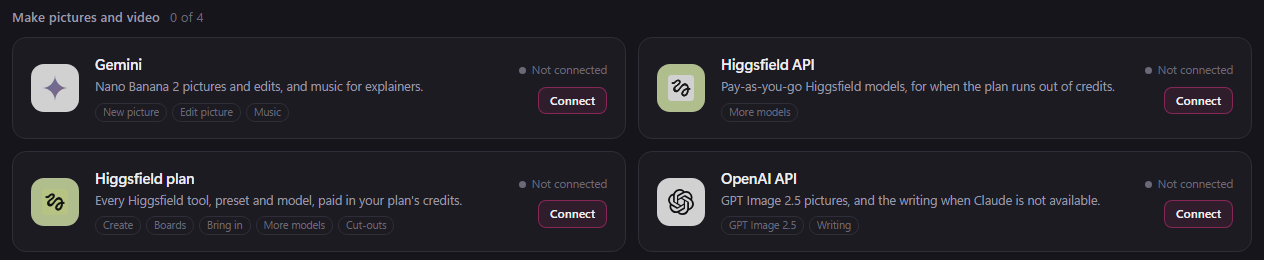
With both connected, a Seedance 2.5 video can go on the plan or the API, chosen for each make, and BosOn’s Explainer Studio can make its pictures, clips and voice on the plan, the API or your own Kie.ai key, each priced before you make it. Whichever you use, what you keep goes into one library on your own computer, named and dated, so the API’s seven days don’t matter. Our guide to Higgsfield on Windows and Mac covers the rest.
Questions people also ask
Does the Higgsfield MCP need an API key?
No. Higgsfield's help centre says the MCP connects through OAuth sign-in and no API key is needed: you sign in with your Higgsfield account, and generations use your plan's credits. The API is the part that needs a key.
What is the Higgsfield MCP URL?
https://mcp.higgsfield.ai/mcp. Higgsfield's official platforms page, updated 24 September 2026, says it is the only official connector URL and that a connector with any other address is not Higgsfield.
Do Unlimited generations work through the Higgsfield MCP?
No. Higgsfield says Unlimited applies only on higgsfield.ai and that MCP always uses credits, as do the CLI, Canvas, Supercomputer and its plugins. Unlimited is meant for personal, hands-on use on the website.
Can I use my Higgsfield plan credits on the API?
No. The API is billed separately from a dollar balance you top up, and Higgsfield's launch post says a plan on higgsfield.ai does not affect API access. Plan credits work on the website and through the MCP, CLI and plugins.
Is the Higgsfield MCP free?
No. Higgsfield's connection guide says an active paid subscription is required, and every MCP generation deducts credits from your plan. Higgsfield's free tier has no credits.
Sources
- Higgsfield Help Center: How do Higgsfield plans work? (updated 14 September 2026)
- Higgsfield Help Center: What are unlimited models? (updated 28 August 2026)
- Higgsfield Help Center: How credits work (updated 22 September 2026)
- Higgsfield Help Center: What is Higgsfield MCP? (updated 24 September 2026)
- Higgsfield Help Center: How do I connect Higgsfield to an AI agent? (updated 24 September 2026)
- Higgsfield Help Center: How do I access Higgsfield via CLI? (updated 24 September 2026)
- Higgsfield Help Center: What is the Higgsfield API? (updated 24 September 2026)
- Higgsfield: Meet the Higgsfield API (16 September 2026)
- Higgsfield API docs
- Higgsfield Help Center: What are the official Higgsfield platforms? (updated 24 September 2026)
- Higgsfield: Terms of Use (updated 26 July 2026)
- Claude Help Center: Get started with custom connectors using remote MCP